
72 lines
3.5 KiB
Markdown
72 lines
3.5 KiB
Markdown
# Cost Management in Azure
|
||
- Goals
|
||
- Describe factors that can affect costs in Azure.
|
||
- Compare the Pricing calculator and Total Cost of Ownership (TCO) calculator.
|
||
- Describe the Microsoft Cost Management Tool.
|
||
- Describe the purpose of tags.
|
||
- ## Factors that can affect costs in Azure
|
||
- CapEx -> OpEx
|
||
- ### Resource type
|
||
- Region, Redundancy, Performance Tier, ...
|
||
- ### Consumption
|
||
- Pay as you go vs Reservered Resources
|
||
- ### Maintenance
|
||
- Deprovision automatically provisioned resources e.g. VMs with network
|
||
- ### Geography
|
||
- ### Network Traffic
|
||
- ## Compare the Pricing and Total Cost of Ownership calculators
|
||
- Pricing Calculator - Estimate Prices for Scenarios in the Azure Cloud
|
||
- TCO Calculator - Estimate Prices for move On-Premise -> Cloud
|
||
- # Governance and compliance
|
||
- Goals
|
||
- Describe the purpose of Microsoft Purview
|
||
- Describe the purpose of Azure Policy
|
||
- Describe the purpose of resource locks
|
||
- Describe the purpose of the Service Trust portal
|
||
- ## Microsoft Purview
|
||
- 
|
||
- Automated data discovery
|
||
- Sensitive data classification
|
||
- End-to-end data lineage
|
||
- Unified data governance
|
||
- Data Catalog –– This enables data discovery.
|
||
- Data Sharing –– This shares data within and between organizations.
|
||
- Data Estate Insights –– This accesses data estate health.
|
||
- Data Policy –– This governs access to data.
|
||
- ## Azure Policy
|
||
- ### Azure Policy initiative
|
||
- grouping related policies together
|
||
- ## Resource locks
|
||
- prevents resources from being accidentally deleted or changed.
|
||
- Delete means authorized users can still read and modify a resource, but they can't delete the resource.
|
||
- ReadOnly means authorized users can read a resource, but they can't delete or update the resource. Applying this lock is similar to restricting all authorized users to the permissions granted by the Reader role.
|
||
- ## Service Trust portal
|
||
- https://servicetrust.microsoft.com/
|
||
- # Managing and deploying Azure resources
|
||
- Goals
|
||
- Describe Azure portal
|
||
- Describe Azure Cloud Shell, including Azure CLI and Azure PowerShell
|
||
- Describe the purpose of Azure Arc
|
||
- Describe Azure Resource Manager (ARM) and Azure ARM templates
|
||
- ## Azure portal
|
||
- web-based, unified console
|
||
- ## Azure Cloud Shell
|
||
- browser-based shell tool
|
||
- ## Azure Powershell / Azure CLI
|
||
- call the Azure REST API to perform management tasks in Azure
|
||
- Azure CLI uses Bash commands
|
||
- ## Azure Arc
|
||
- use Azure Resource Manager
|
||
- Azure Arc allows you to manage the following resource types hosted outside of Azure:
|
||
- Servers
|
||
- Kubernetes clusters
|
||
- Azure data services
|
||
- SQL Server
|
||
- Virtual machines (preview)
|
||
- # Monitoring Tools in Azure
|
||
- ## Azure Advisor
|
||
- displays personalized recommendations for all your subscriptions.
|
||
- ## Azure Service Health
|
||
- Service health, and Resource Health, Azure Service Health gives you a complete view of your Azure environment-all the way from the global status of Azure services and regions down to specific resources
|
||
- ## Azure Monitor
|
||
- 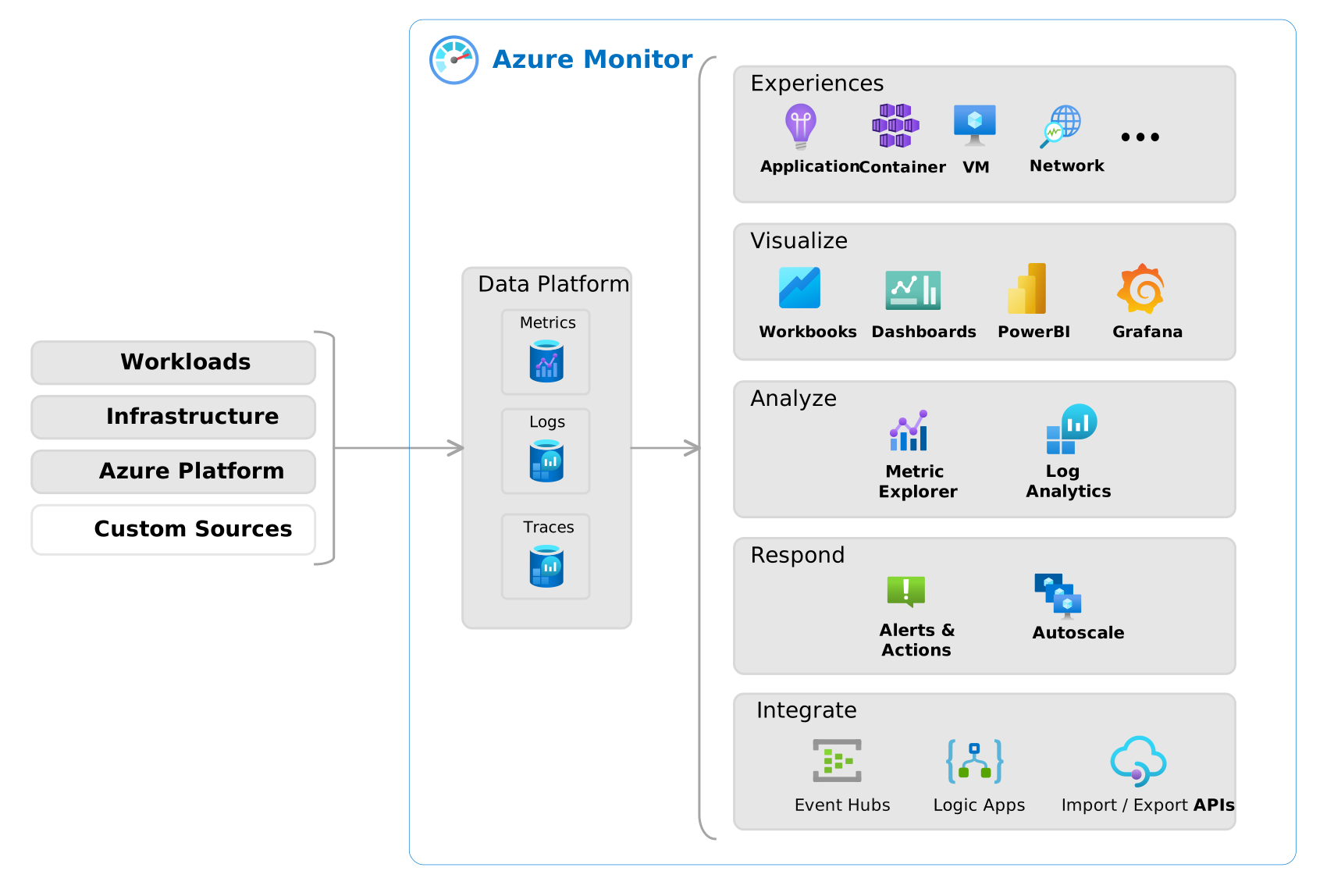 |