30 KiB
30 KiB
The core architectural components of Azure
- 
- Global Services: Microsoft Entra ID, Azure Traffic Manager, and Azure DNS
- **Physical Infrastructure**
collapsed:: true
- Goals
collapsed:: true
- Describe Azure regions, region pairs, and sovereign regions.
- Describe Availability Zones.
- Describe Azure datacenters.
- datacenters ([reliabilty](https://datacenters.microsoft.com/))
collapsed:: true
- grouped in (for resiliency, reliabilty)
- **Regions**
- geographical area
- multiple datacenters networked together with low-latency network
- **Availabilty Zones** (AZ)
- one or more physically separate datacenters (independent power, cooling, networking) within an Azure region
- Connected with high speed, private fiber-optic cable
- Minimum of three AZs available in regions with AZ
- 
- primarily for, load balancers, and
- Zonal services: pinned to a zone (VMs, managed disks, IP adresses)
- Zone-redundant services: replicated (SQL databases)
- Non-regional services: Entra-ID, ...
- **Region Pair** (i.e. West US paired with East US, South-East Asia paired with East Asia)
- within the same geography at least 300 miles away
- Cope with: natural disasters, civil unrest, power outages, or physical network outages
- Updates one region at a time
- One is prioritized for extensive Azure outage
- **Sovereign Regions**
collapsed:: true
- isolated from the main instance
- for compliance or legal purposes
- **Management Infrastructure**
collapsed:: true
- Goals
collapsed:: true
- Describe Azure resources and Resource Groups.
- Describe subscriptions.
- Describe management groups.
- Describe the hierarchy of resource groups, subscriptions, and management groups.
- **Resource**
collapsed:: true
- Anything you create, provision, deploy (VMs, VNs, DBs, ...)
- **Resource Group**
collapsed:: true
- 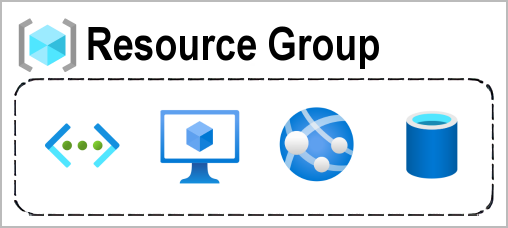
- Group resources (not nested)
- Resource can only be in one group
- Apply action or policy on resource group -> apply on all resources
- **Azure Subscription**
collapsed:: true
- {:height 277, :width 654}
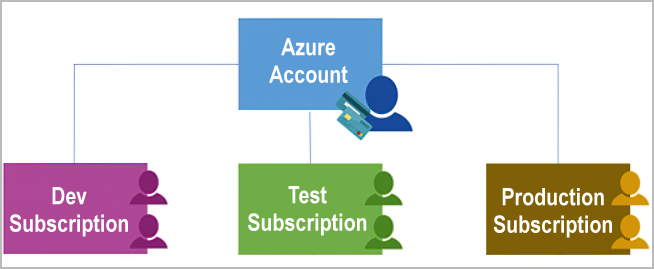
- Unit of management, billing, and scale
- provides you with **authenticated** and **authorized** access to Azure products and services
- Boundaries around products, services and resources
collapsed:: true
- **Billing boundary**
- **Access control boundary**: access-management policies at the subscription level
- Separates Subscriptions based on
collapsed:: true
- **Environments**: Dev vs Testing
- **Organizational structures**: IT vs HR
- **Billing**: Production vs Rest
- **Management Groups**
collapsed:: true
- https://learn.microsoft.com/en-us/training/wwl-azure/describe-core-architectural-components-of-azure/media/management-groups-subscriptions-dfd5a108-60f31f5a.png
- organize subscriptions into containers called management groups and apply governance conditions to the management groups
- Facts
collapsed:: true
- 10,000 management groups can be supported in a single directory.
- A management group tree can support up to six levels of depth. This limit doesn't include the root level or the subscription level.
- Each management group and subscription can support only one parent.
-
Azure compute and networking services
- Goals
collapsed:: true
- Compare compute types, including container instances, virtual machines, and functions
- Describe virtual machine (VM) options, including VMs, Virtual Machine Scale Sets, availability sets, Azure Virtual Desktop
- Describe resources required for virtual machines
- Describe application hosting options, including Azure Web Apps, containers, and virtual machines
- Describe virtual networking, including the purpose of Azure Virtual Networks, Azure virtual subnets, peering, Azure DNS, VPN Gateway, and ExpressRoute
- Define public and private endpoints
-
Azure virtual machines (IaaS)
collapsed:: true- VMs provide infrastructure as a service
collapsed:: true
- Total control over the operating system (OS).
- The ability to run custom software.
- To use custom hosting configurations.
-
Virtual machine scale sets
collapsed:: true- group of identical, load-balanced VMs
collapsed:: true
- automatically increase or decrease in response to demand
- scale based on a defined schedule
- group of identical, load-balanced VMs
collapsed:: true
-
Virtual machine availability sets (no additional cost)
collapsed:: true- stagger updates and have varied power and network connectivity by up to three fault domains
- update domain
collapsed:: true
- VMs that can be rebooted at the same time
- fault domain
collapsed:: true
- VMs by common power source and network switch
-
Exercise - Create an Azure virtual machine
collapsed:: true-
az vm create --resource-group "learn-f942f893-d72a-4614-9bec-d920bd0d3c96" --name my-vm --public-ip-sku Standard --image Ubuntu2204 --admin-username azureuser --generate-ssh-keys -
az vm extension set --resource-group "learn-f942f893-d72a-4614-9bec-d920bd0d3c96" --vm-name my-vm --name customScript --publisher Microsoft.Azure.Extensions --version 2.1 --settings '{"fileUris":["https://raw.githubusercontent.com/MicrosoftDocs/mslearn-welcome-to-azure/master/configure-nginx.sh"]}' --protected-settings '{"commandToExecute": "./configure-nginx.sh"}'
-
- VMs provide infrastructure as a service
collapsed:: true
-
Azure virtual desktop
- cloud-hosted version of Windows
- connect with any devices, secure data in the cloud
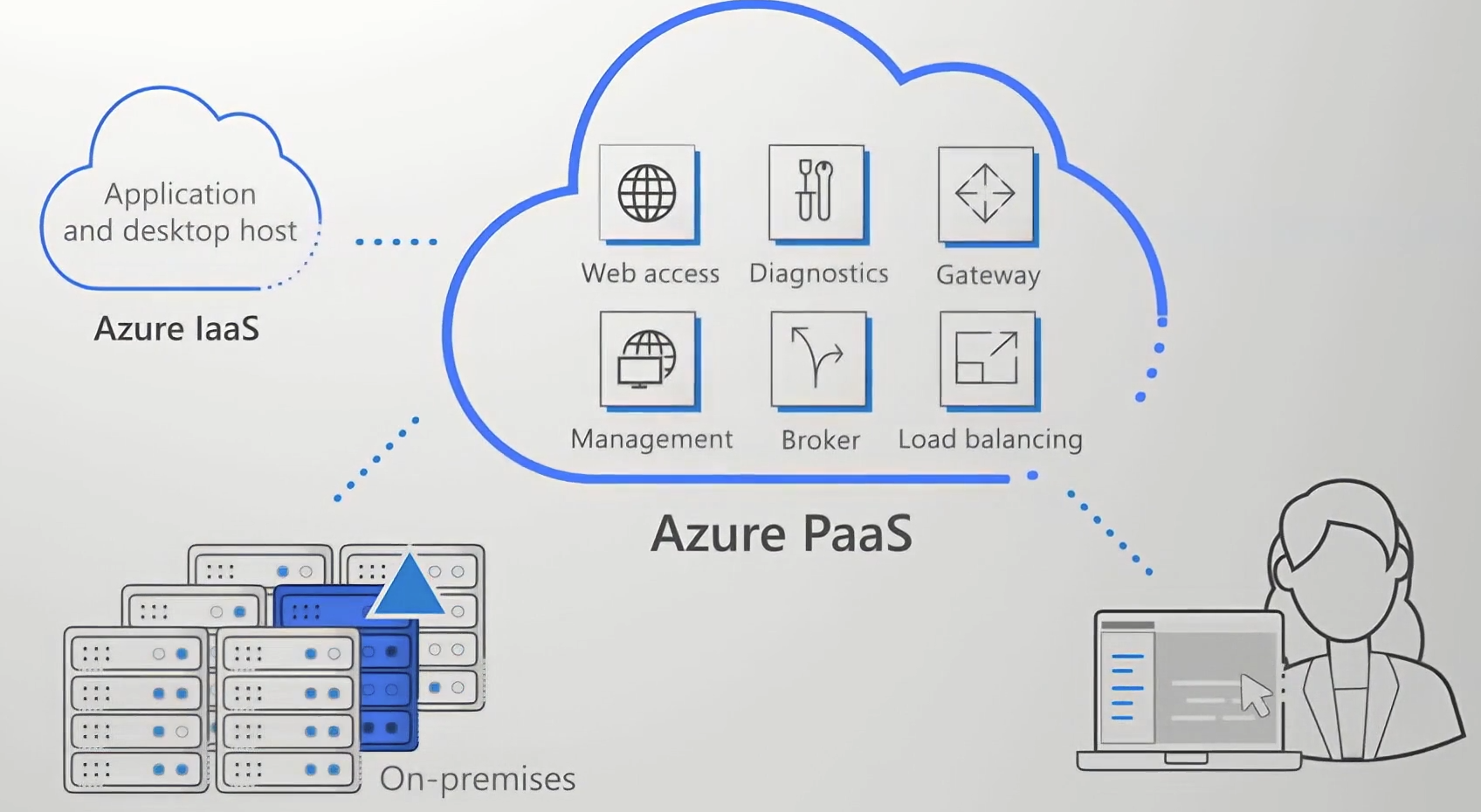
- data and apps are separated from the local hardware
- user sessions are isolated in both single and multi-session environments.
-
Azure containers
- you don't manage the operating system for a container
- VMs virtualize Hardware <-> Container virtualize OS
-
Azure Container Instances (PaaS)
collapsed:: true- upload your containers and then the service runs the containers for you
-
Azure Container Apps (PaaS)
collapsed:: true- incorporate load balancing and scaling
-
Azure Kubernetes Service (AKS)
collapsed:: true- orchestration service manages the lifecycle of containers
-
Azure functions
- event-driven, serverless compute option
- an event wakes the function, alleviating the need to keep resources provisioned when there are no events
- work can be completed quickly, within seconds or less.
- stateless: behave as if they restart every time
- stateful: Durable Functions - a context is passed through the function to track prior activity
-
Azure App Service
- HTTP-based service for hosting web applications, REST APIs, and mobile back ends
- automatic scaling and high availability
-
Web apps
- full support for hosting web apps
-
API apps
collapsed:: true- REST-based web APIs by using your choice of language and framework. You get full Swagger support and the ability to package and publish your API in Azure Marketplace
-
WebJobs
collapsed:: true- to run a program or script in the same context as a web app, API app, or mobile app
- scheduled or run by a trigger
- are often used to run background tasks as part of your application logic.
-
Mobile apps
collapsed:: true- quickly build a back end for iOS and Android apps
collapsed:: true
- Store mobile app data in a cloud-based SQL database.
- Send push notifications.
- ...
- quickly build a back end for iOS and Android apps
collapsed:: true
-
Azure virtual networking
- Public endpoints: have a public IP address and can be accessed from anywhere in the world.
- Private endpoints: exist within a virtual network and have a private IP address from within the address space of that virtual network.
-
Isolation and segmentation
- define a private IP address space by using either public or private IP address ranges
- divide that IP address space into subnets and allocate part of the defined address space to each named subnet.
- use the name resolution service built into Azure or use either an internal or an external DNS server
-
Internet communications
- enable incoming connections from the internet by assigning a public IP
- putting the resource behind a public load balancer
-
Communicate between Azure resources
- Virtual Networks connect: App Service Environment for Power Apps, Azure Kubernetes Service, and Azure virtual machine scale sets
- Service endpoints can connect to other Azure resource types, such as Azure SQL databases and storage accounts
-
Communicate with on-premises resources
- link resources together in your on-premises environment and within your Azure subscription
- create a network that spans both your local and cloud environments
- Point-to-site virtual private network: connections are from a computer outside your organization back into your corporate network. In this case, the client computer initiates an encrypted VPN connection to connect to the Azure virtual network.
- Site-to-site virtual private networks: link your on-premises VPN device or gateway to the Azure VPN gateway in a virtual network. In effect, the devices in Azure can appear as being on the local network. The connection is encrypted and works over the internet.
- Azure ExpressRoute: provides a dedicated private connectivity to Azure that doesn't travel over the internet. ExpressRoute is useful for environments where you need greater bandwidth and even higher levels of security.
-
Route network traffic
- Azure routes traffic between subnets on any connected virtual networks, on-premises networks, and the internet.
- Route tables allow you to define rules about how traffic should be directed
- Border Gateway Protocol (BGP) works with Azure VPN gateways, Azure Route Server, or Azure ExpressRoute to propagate on-premises BGP routes to Azure virtual networks.
-
Filter network traffic
- Network security groups are Azure resources that can contain multiple inbound and outbound security rules. You can define these rules to allow or block traffic, based on factors such as source and destination IP address, port, and protocol.
- Network virtual appliances are specialized VMs that can be compared to a hardened network appliance. A network virtual appliance carries out a particular network function, such as running a firewall or performing wide area network (WAN) optimization.
-
Connect virtual networks
- link virtual networks together by using virtual network peering
- Network traffic between peered networks is private, and travels on the Microsoft backbone network, never entering the public internet.
-
Azure virtual private networks
collapsed:: true-
VPN gateways
collapsed:: true- only one VPN gateway in each virtual network
- one gateway to connect to multiple locations, which includes other virtual networks or on-premises datacenters.
- Connect on-premises datacenters to virtual networks through a site-to-site connection.
- Connect individual devices to virtual networks through a point-to-site connection.
- Connect virtual networks to other virtual networks through a network-to-network connection.
- Policy-based
collapsed:: true
- VPN gateways specify statically the IP address of packets that should be encrypted through each tunnel. This type of device evaluates every data packet against those sets of IP addresses to choose the tunnel where that packet is going to be sent through.
- Route-based
collapsed:: true
- IPSec tunnels are modeled as a network interface or virtual tunnel interface. IP routing (either static routes or dynamic routing protocols) decides which one of these tunnel interfaces to use when sending each packet. Route-based VPNs are the preferred connection method for on-premises devices. They're more resilient to topology changes such as the creation of new subnets.
- Connections between virtual networks
- Point-to-site connections
- Multisite connections
- Coexistence with an Azure ExpressRoute gateway
- primary distinction between these two types is how they determine which traffic needs encryption.
-
High-availability scenarios
collapsed:: true-
Active/standby
collapsed:: true- gateways are deployed as two instances in an active/standby configuration, even if you only see one VPN gateway resource in Azure
-
Active/active
collapsed:: true- assign a unique public IP address to each instance. You then create separate tunnels from the on-premises device to each IP address. You can extend the high availability by deploying an additional VPN device on-premises.
-
ExpressRoute failover
collapsed:: true- provision a VPN gateway that uses the internet as an alternative method of connectivity
-
Zone-redundant gateways
collapsed:: true- In regions that support availability zones, VPN gateways and ExpressRoute gateways can be deployed in a zone-redundant configuration. This configuration brings resiliency, scalability, and higher availability to virtual network gateways. Deploying gateways in Azure availability zones physically and logically separates gateways within a region while protecting your on-premises network connectivity to Azure from zone-level failures. These gateways require different gateway stock keeping units (SKUs) and use Standard public IP addresses instead of Basic public IP addresses.
-
-
Azure ExpressRoute
collapsed:: true- extend your on-premises networks into the Microsoft cloud over a private connection
- Connectivity can be from an any-to-any (IP VPN) network, a point-to-point Ethernet network, or a virtual cross-connection through a connectivity provider at a colocation facility
- ExpressRoute connections don't go over the public Internet
-
Azure DNS
collapsed:: true-
Reliability and performance
collapsed:: true- Azure DNS uses anycast networking, so the closest available DNS server answers each DNS query
-
Security
collapsed:: true- Azure role-based access control, Activity logs, Resource locking
-
Ease of use
collapsed:: true- manage your domains and records with the Azure portal, Azure PowerShell cmdlets, and the cross-platform Azure CLI.
-
Customizable virtual networks with private domains
-
Alias records
-
-
- Goals
collapsed:: true
-
Azure storage services
- Goals
collapsed:: true
- Compare Azure storage services.
- Describe storage tiers.
- Describe redundancy options.
- Describe storage account options and storage types.
- Identify options for moving files, including AzCopy, Azure Storage Explorer, and Azure File Sync.
- Describe migration options, including Azure Migrate and Azure Data Box.
-
Azure storage accounts
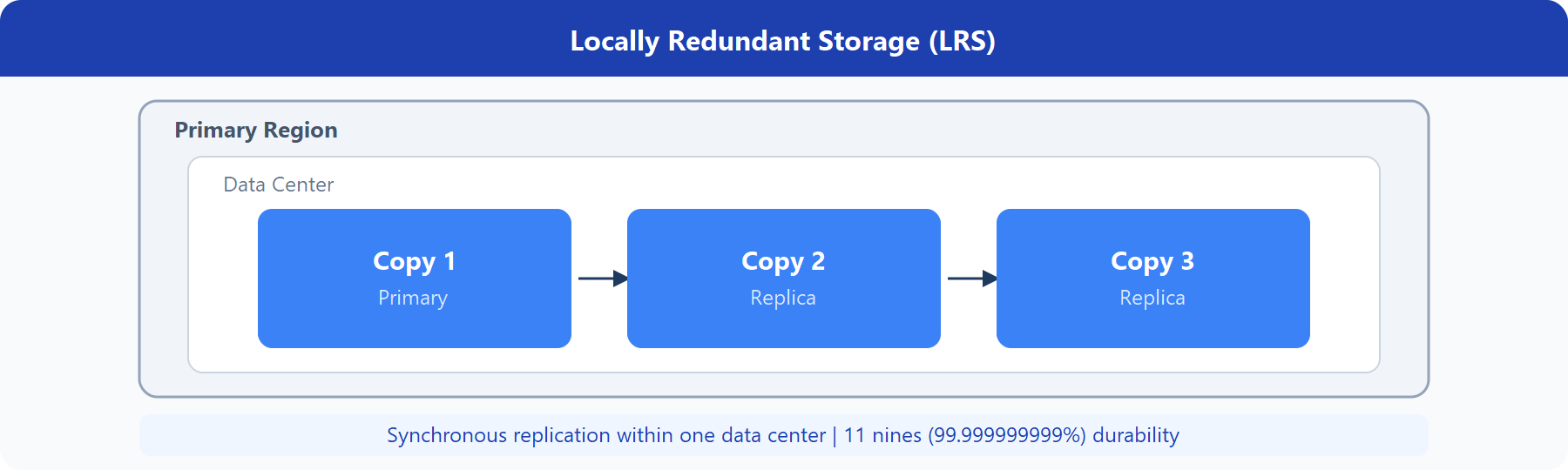
collapsed:: true- Locally redundant storage (LRS)
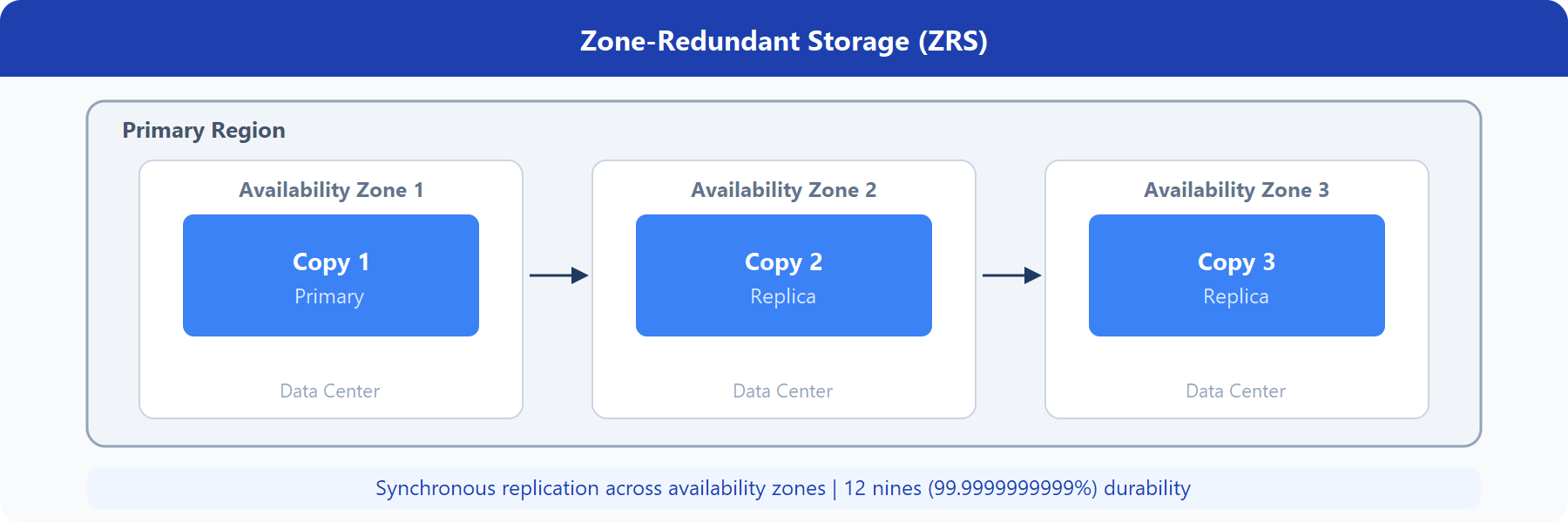
- Zone-redundant storage (ZRS)
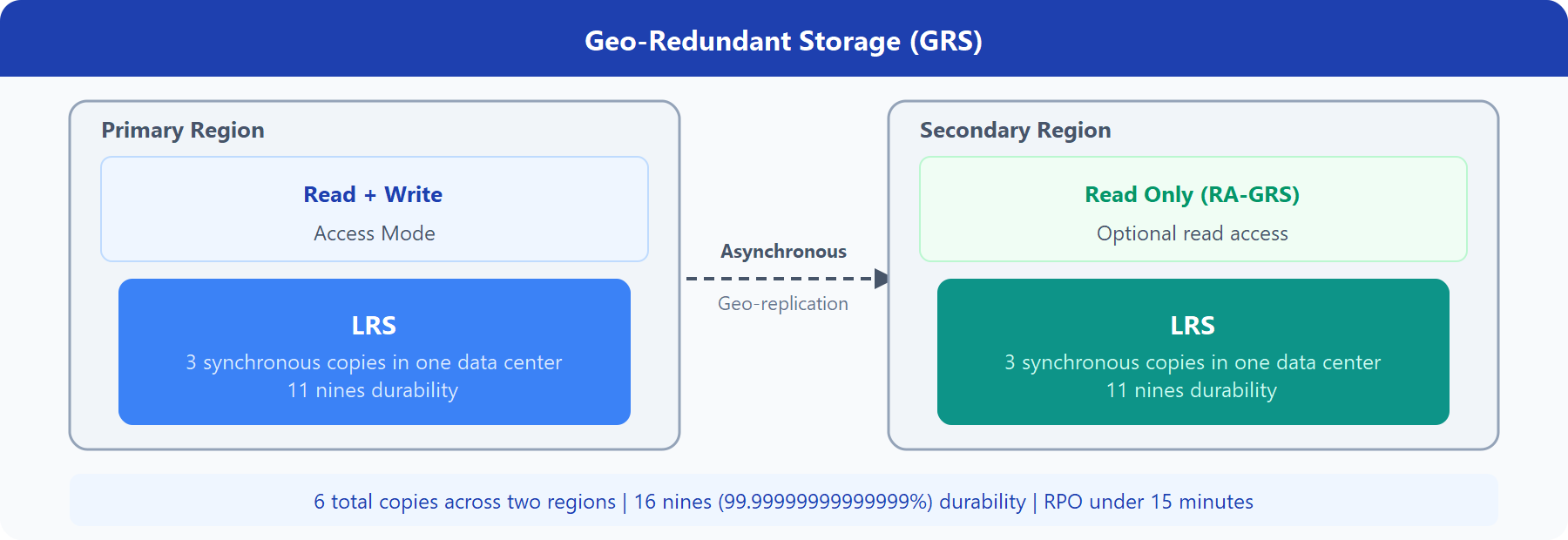
- Geo-redundant storage (GRS)
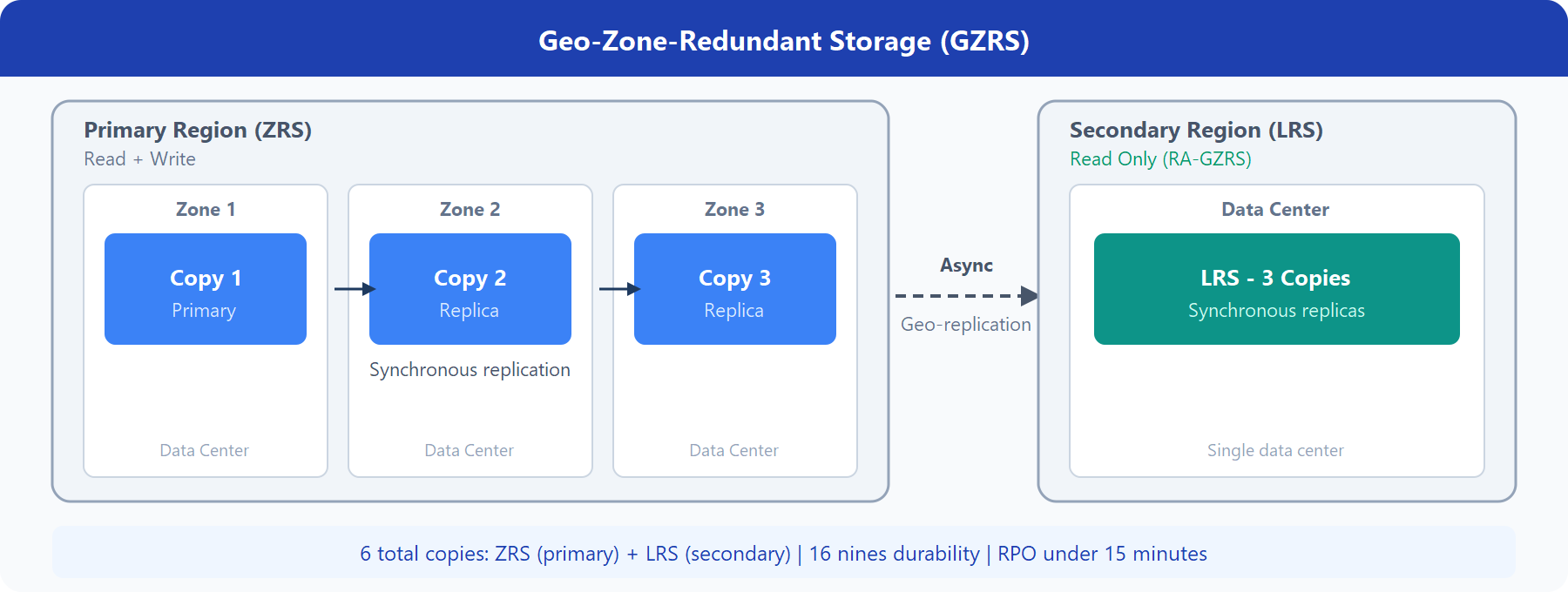
- Geo-zone-redundant storage (GZRS)
- Read-access geo-redundant storage (RA-GRS)
- Read-access geo-zone-redundant storage (RA-GZRS)
- | Type | Supported services | Redundancy Options | Usage | | ---- | ---- | ---- | | Standard general-purpose v2 | Blob Storage (including Data Lake Storage), Queue Storage, Table Storage, and Azure Files | LRS, GRS, RA-GRS, ZRS, GZRS, RA-GZRS | Standard storage account type for blobs, file shares, queues, and tables. Recommended for most scenarios using Azure Storage. If you want support for network file system (NFS) in Azure Files, use the premium file shares account type. | | Premium block blobs | Blob Storage (including Data Lake Storage) | LRS, ZRS | Premium storage account type for block blobs and append blobs. Recommended for scenarios with high transaction rates or that use smaller objects or require consistently low storage latency. | | Premium file shares | Azure Files | LRS, ZRS | Premium storage account type for file shares only. Recommended for enterprise or high-performance scale applications. Use this account type if you want a storage account that supports both Server Message Block (SMB) and NFS file shares. | | Premium page blobs | Page blobs only | LRS | Premium storage account type for page blobs only |
-
Storage account endpoints
collapsed:: true- between 3 and 24 characters in length and may contain numbers and lowercase letters only.
- unique within Azure
-
Storage service Endpoint Blob Storage https://.blob.core.windows.net Data Lake Storage Gen2 https://.dfs.core.windows.net Azure Files https://.file.core.windows.net Queue Storage https://.queue.core.windows.net Table Storage https://.table.core.windows.net
-
Azure storage redundancy
-
Redundancy in the primary region
- Locally redundant storage
- Zone-redundant storage
- Locally redundant storage
-
Redundancy in a secondary region
- Geo-redundant storage
- Geo-zone-redundant storage
- Read access to data in the secondary region
- GRS and GZRS with read access (normally not possible)
- Geo-redundant storage
-
-
Azure storage services
collapsed:: true- Azure Blobs: A massively scalable object store for text and binary data. Also includes support for big data analytics through Data Lake Storage Gen2.
collapsed:: true
- Hot access tier: Optimized for storing data that is accessed frequently (for example, images for your website).
- Cool access tier: Optimized for data that is infrequently accessed and stored for at least 30 days (for example, invoices for your customers).
- Cold access tier: Optimized for storing data that is infrequently accessed and stored for at least 90 days.
- Archive access tier: Appropriate for data that is rarely accessed and stored for at least 180 days, with flexible latency requirements (for example, long-term backups).
- Azure Files: Managed file shares for cloud or on-premises deployments.
collapsed:: true
- accessible Server Message Block (SMB) or Network File System (NFS) protocols
- Azure Queues: A messaging store for reliable messaging between application components.
- Azure Disks: Block-level storage volumes for Azure VMs.
- Azure Tables: NoSQL table option for structured, non-relational data.
- Azure Blobs: A massively scalable object store for text and binary data. Also includes support for big data analytics through Data Lake Storage Gen2.
collapsed:: true
-
Identify Azure data migration options
collapsed:: true- Azure Migrate: Discovery and assessment. Discover and assess on-premises servers running on VMware, Hyper-V, and physical servers in preparation for migration to Azure.
- Azure Migrate: Server Migration. Migrate VMware VMs, Hyper-V VMs, physical servers, other virtualized servers, and public cloud VMs to Azure.
- Data Migration Assistant. Data Migration Assistant is a stand-alone tool to assess SQL Servers. It helps pinpoint potential problems blocking migration. It identifies unsupported features, new features that can benefit you after migration, and the right path for database migration.
- Azure Database Migration Service. Migrate on-premises databases to Azure VMs running SQL Server, Azure SQL Database, or SQL Managed Instances.
- Azure App Service migration assistant. Azure App Service migration assistant is a standalone tool to assess on-premises websites for migration to Azure App Service. Use Migration Assistant to migrate .NET and PHP web apps to Azure.
collapsed:: true
- Azure Data Box. Use Azure Data Box products to move large amounts of offline data to Azure. Suited to transfer data sizes larger than 40 TBs - 80 TB
-
Azure file movement options
collapsed:: true- AzCopy copy blobs or files to or from your storage account
- Azure Storage Explorer standalone app
- Azure File Sync stay bi-directionally synced with your files in Azure.
- Goals
collapsed:: true
-
Azure identity, access, and security
- Goals:
- Describe directory services in Azure, including Microsoft Entra ID and Microsoft Entra Domain Services
- Describe authentication methods in Azure, including single sign-on (SSO), multifactor authentication (MFA), and passwordless
- Describe external identities and guest access in Azure
- Describe Microsoft Entra Conditional Access
- Describe Azure Role Based Access Control (RBAC)
- Describe the concept of Zero Trust
- Describe the purpose of the defense in depth model
- Describe the purpose of Microsoft Defender for Cloud
-
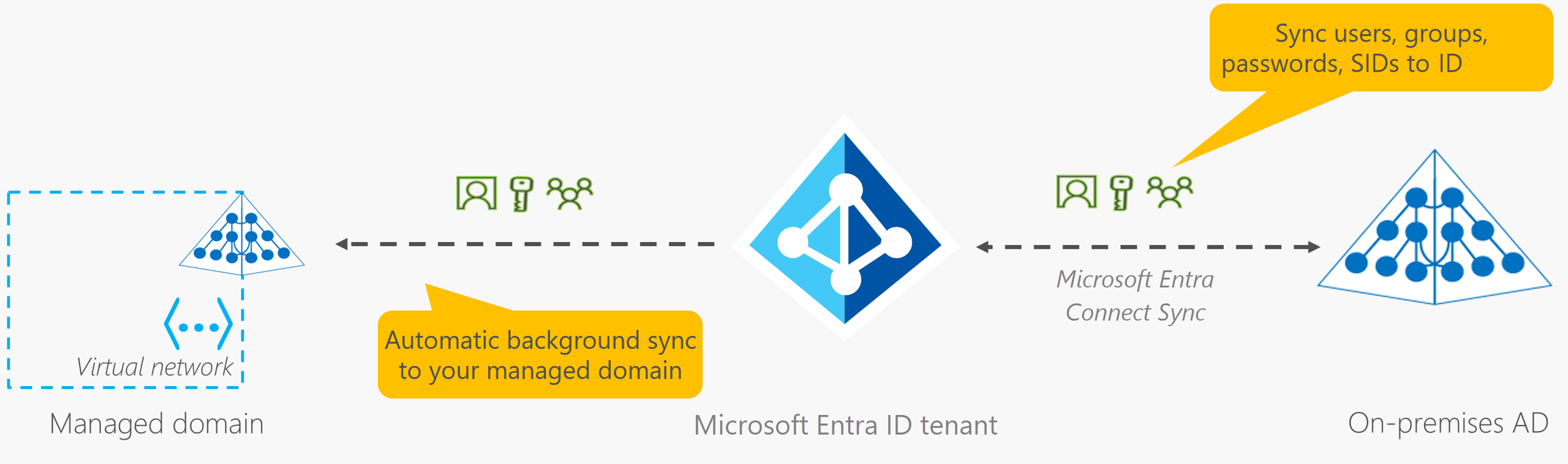
Azure directory services
-
Microsoft Entra ID
- Authentication: This includes verifying identity to access applications and resources. It also includes providing functionality such as self-service password reset, multifactor authentication, a custom list of banned passwords, and smart lockout services.
- Single sign-on: Single sign-on (SSO) enables you to remember only one username and one password to access multiple applications. A single identity is tied to a user, which simplifies the security model. As users change roles or leave an organization, access modifications are tied to that identity, which greatly reduces the effort needed to change or disable accounts.
- Application management: You can manage your cloud and on-premises apps by using Microsoft Entra ID. Features like Application Proxy, SaaS apps, the My Apps portal, and single sign-on provide a better user experience.
- Device management: Along with accounts for individual people, Microsoft Entra ID supports the registration of devices. Registration enables devices to be managed through tools like Microsoft Intune. It also allows for device-based Conditional Access policies to restrict access attempts to only those coming from known devices, regardless of the requesting user account.
-
Active Directory
- On on-premises environments, Active Directory running on Windows Server provides an identity and access management service that's managed by your organizatio
-
Microsoft Entra Domain Services
- unique namespace. This namespace is the domain name. Two Windows Server domain controllers are then deployed into your selected Azure region. This deployment of DCs is known as a replica set.
-
Azure authentication methods
-
Single sign-on (SSO)
- Single sign-on is only as secure as the initial authenticator because the subsequent connections are all based on the security of the initial authenticator.
-
Passwordless authentication
- Windows Hello for Business
- Microsoft Authenticator app
- FIDO2 security keys (Fast IDentity Online)
-
-
Azure external identities
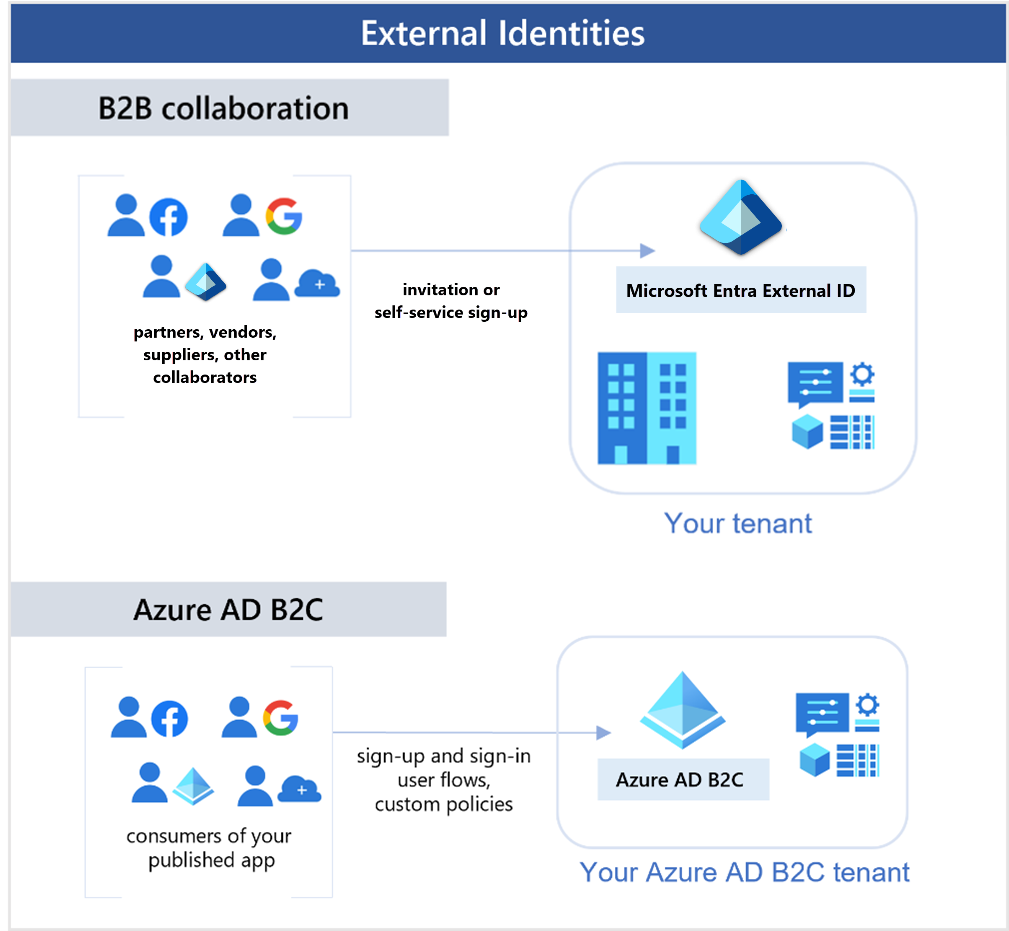
- Business to business (B2B) collaboration - Collaborate with external users by letting them use their preferred identity to sign-in to your Microsoft applications or other enterprise applications (SaaS apps, custom-developed apps, etc.). B2B collaboration users are represented in your directory, typically as guest users.
- B2B direct connect - Establish a mutual, two-way trust with another Microsoft Entra organization for seamless collaboration. B2B direct connect currently supports Teams shared channels, enabling external users to access your resources from within their home instances of Teams. B2B direct connect users aren't represented in your directory, but they're visible from within the Teams shared channel and can be monitored in Teams admin center reports.
- Microsoft Azure Active Directory business to customer (B2C) - Publish modern SaaS apps or custom-developed apps (excluding Microsoft apps) to consumers and customers, while using Azure AD B2C for identity and access management.
-
Azure conditional access
- Microsoft Entra ID uses to allow (or deny) access to resources based on identity signals.
- These signals include who the user is, where the user is, and what device the user is requesting access from.
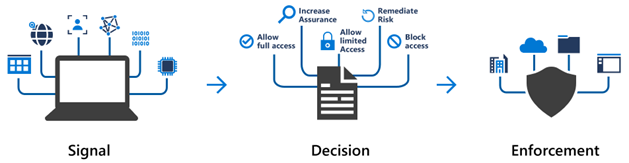
- Require multifactor authentication (MFA) to access an application depending on the requester’s role, location, or network. For example, you could require MFA for administrators but not regular users or for people connecting from outside your corporate network.
- Require access to services only through approved client applications. For example, you could limit which email applications are able to connect to your email service.
- Require users to access your application only from managed devices. A managed device is a device that meets your standards for security and compliance.
- Block access from untrusted sources, such as access from unknown or unexpected locations.
- Microsoft Entra ID uses to allow (or deny) access to resources based on identity signals.
-
Azure role-based access control
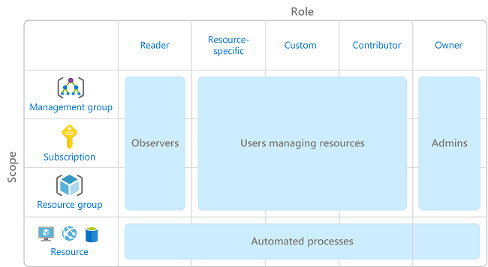
- principle of least privilege
- role has an associated set of access permissions that relate to that role. When you assign individuals or groups to one or more roles, they receive all the associated access permissions.
- Role-based access control is applied to a scope, which is a resource or set of resources that this access applies to.
- https://learn.microsoft.com/en-us/training/wwl-azure/describe-azure-identity-access-security/media/role-based-access-scope-4b12a8f3-7f40fc55.png
- Azure RBAC is hierarchical, in that when you grant access at a parent scope, those permissions are inherited by all child scopes
- Azure RBAC uses an allow model
-
Zero Trust
- Zero Trust assumes breach at the outset, and then verifies each request as though it originated from an uncontrolled network.
- Verify explicitly - Always authenticate and authorize based on all available data points.
- Use least privilege access - Limit user access with Just-In-Time and Just-Enough-Access (JIT/JEA), risk-based adaptive policies, and data protection.
- Assume breach - Minimize blast radius and segment access. Verify end-to-end encryption. Use analytics to get visibility, drive threat detection, and improve defenses.
- https://learn.microsoft.com/en-us/training/wwl-azure/describe-azure-identity-access-security/media/zero-trust-cf9202be-d5c6882e.png
-
Defense-in-depth
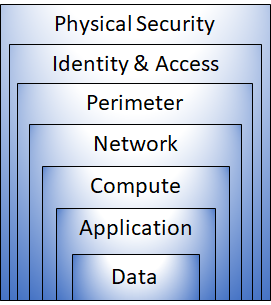
- The physical security layer is the first line of defense to protect computing hardware in the datacenter.
- The identity and access layer controls access to infrastructure and change control.
- The perimeter layer uses distributed denial of service (DDoS) protection to filter large-scale attacks before they can cause a denial of service for users.
- The network layer limits communication between resources through segmentation and access controls.
- The compute layer secures access to virtual machines.
- The application layer helps ensure that applications are secure and free of security vulnerabilities.
- The data layer controls access to business and customer data that you need to protect.
-
Microsoft Defender for Cloud
- monitoring tool for security posture management and threat protection
- extended to non-Azure machines with the help of Azure Arc
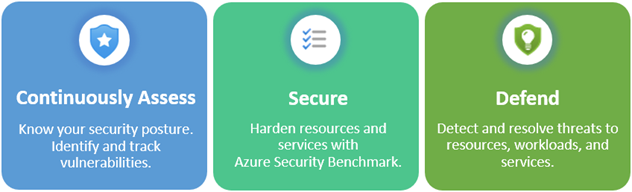
- Azure Security Benchmark
- monitoring tool for security posture management and threat protection
- Goals: